Custom function
This example pipeline, CustomFunction.pyp, shows how to define and call your own function in a pipeline. Functions in NeuroPype work much the same way as in other programming languages: you define a function, and can then call it from anywhere in the pipeline, passing data to it in the form of arguments. The function returns a value, which the call node passes on to the next node. You can define as many custom functions in a pipeline as you like, and call the same function from multiple locations in the pipeline.
The function in this example calculates and returns the length of the data, in minutes, and the pipeline prints it.
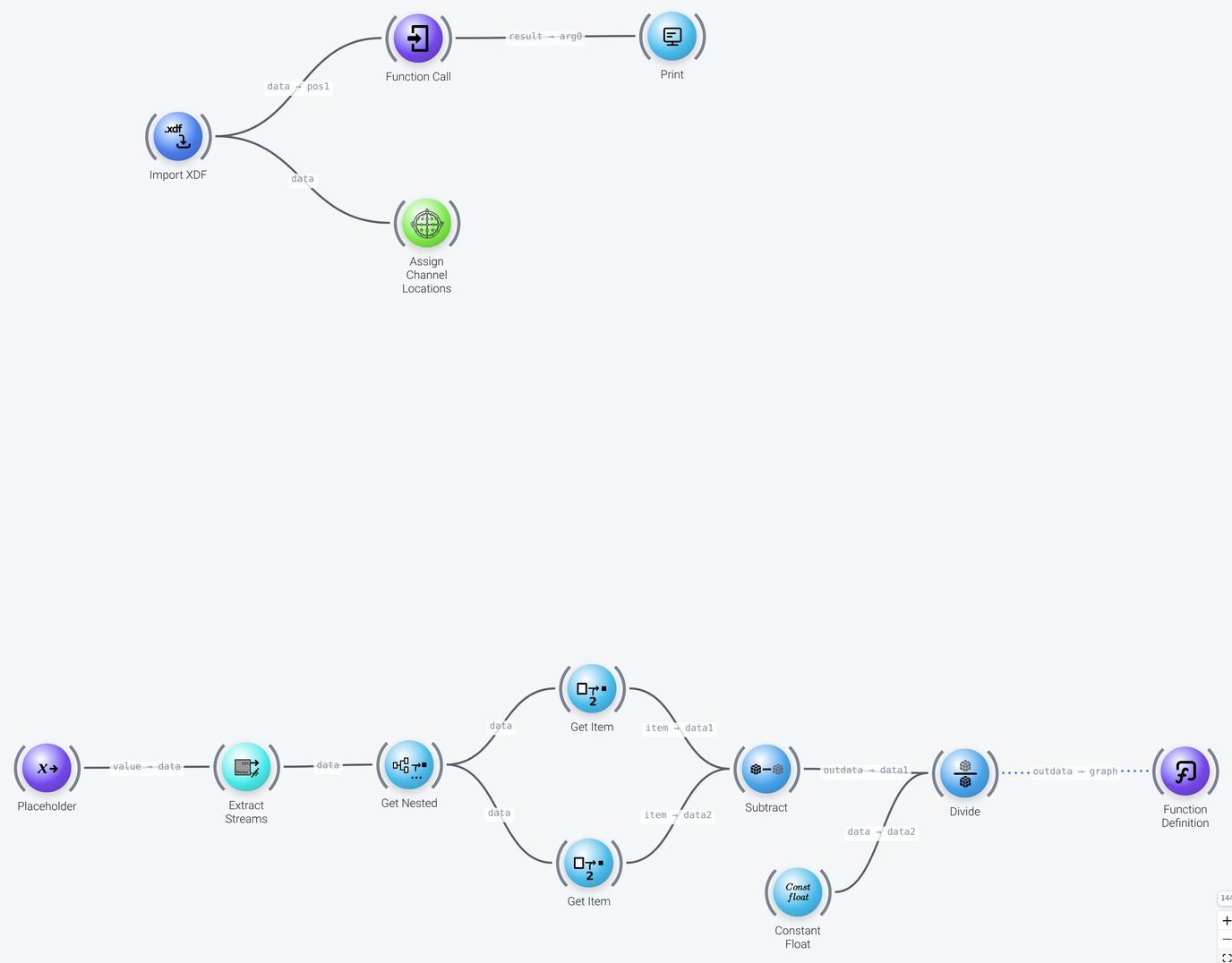
The pipeline consists of two parts: the pipeline itself, in the top part of the canvas, which calls the function, and the custom function, in the bottom part.
The Pipeline
Includes: Import XDF, Function Call, Print and Assign Channel Locations
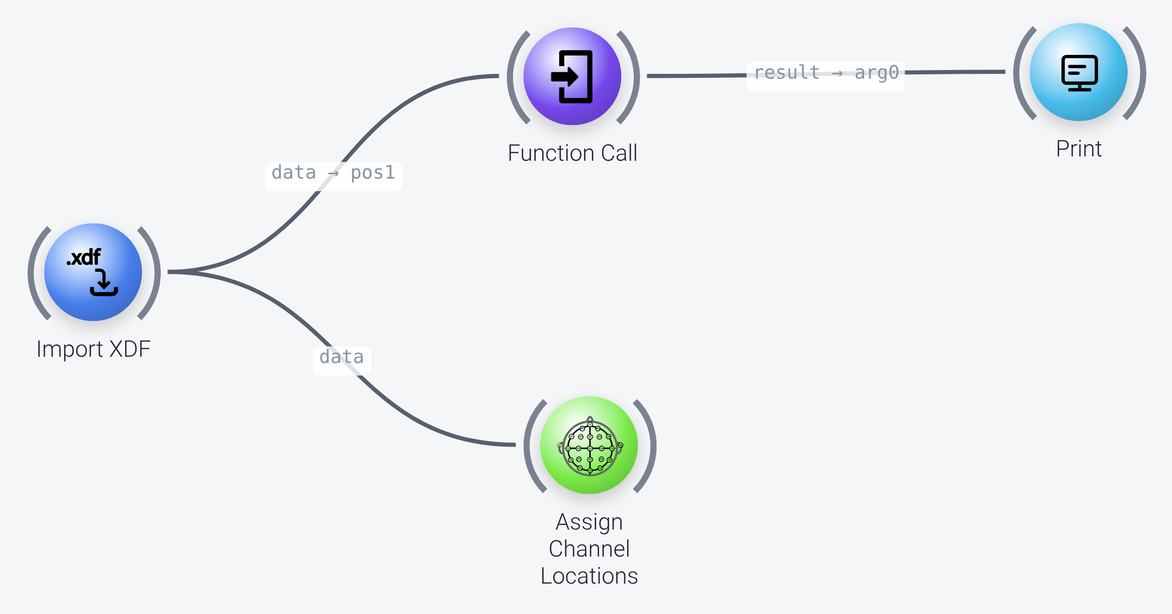
The pipeline imports a recording with the Import XDF node (the file is VisualArrest.xdf, set by its filename property). The imported data is wired into the pos1 port of a Function Call node, which will assign it to the first argument that is defined in the function.
The arguments of a function can be passed to it in two ways, and the Function Call node supports both:
- Positionally: you wire the data into the
pos1,pos2, ... ports (posN). The data inpos1is assigned to the first argument that is listed in the signature of the function, the data inpos2to the second one, and so on, so the order matters. This is what is done here, with a single argument. - By name (as keyword arguments): you set the name of the argument in one of the
name1,name2, ... properties, and wire the value into the matchingval1,val2, ... port (for instance, aname1ofdata, and the data wired intoval1). The arguments are then assigned by their names, irrespective of their order. Further keyword arguments can be passed as a dictionary through theargdictport.
You can use both in the same call. The function definition has to match the way in which the function is called, as we will see below.
The Function Call node calls the function that is named in its funcname property (time_range_in_min), passes it the data that is assigned to pos1, receives the output of the function, and passes it out through its result port. Here, the result is printed to the console by a Print node, with the text length of data in min: %.2f (its string property).
The Assign Channel Locations node is only there to show that the pipeline could continue here, to process the imported data.
The Function
The function is defined by a Function Definition node at the end of the chain of nodes in the bottom part of the canvas, which is the body of the function. The Function Definition node has the name of the function (funcname, here time_range_in_min), a desc (description, here Time range of the data, expressed in minutes) and a graph [signature] property that lists the names of the arguments of the function. How the arguments are listed in the signature has to match the way in which the function is called. If the arguments are passed positionally, they are assigned in the order in which they are listed in the signature, and if they are passed by name, the names have to be the ones that are listed in the signature (but their order does not matter). Arguments that should only ever be passed by name can be listed after a + separator in the signature, as in (arg1,arg2,+,kw1,kw2). These keyword arguments cannot be passed positionally when the function is called, which protects against mistakes in the order of the arguments. Here, the function takes a single argument, which is named data. The data that is passed into the pos1 port of the Function Call node is assigned to this argument (it could also have been passed by name, with a name1 of data and the data wired into val1), and passed on to the Placeholder node (see the left side of the function) whose slotname property is the same, data. A Placeholder node is needed for each argument of the function, and it must have the same name as the argument defined in the signature.
Includes: Placeholder, Extract Streams, Get Nested, Get Item, Subtract, Constant Float, Divide and Function Definition
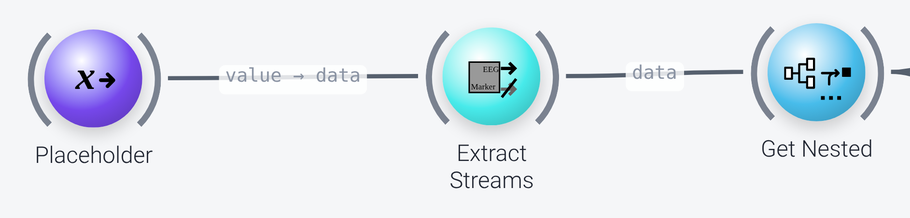
The data then passes through the nodes of the function:
Extract Streamstakes the EEG stream, using the criterion{'modality': 'EEG'}in itsselection_criteriaproperty.Get Nestedextracts the array of time stamps of the data. Itspathproperty,:chunks|eeg|:block|:axes|time|:times, which is written in thepipesyntax, specifies the path to this array, from theeegstream (a chunk of the packet) to thetimesfield of itstimeaxis. Using this node requires some knowledge of the structure of the data packets. See the documentation of the node for details.
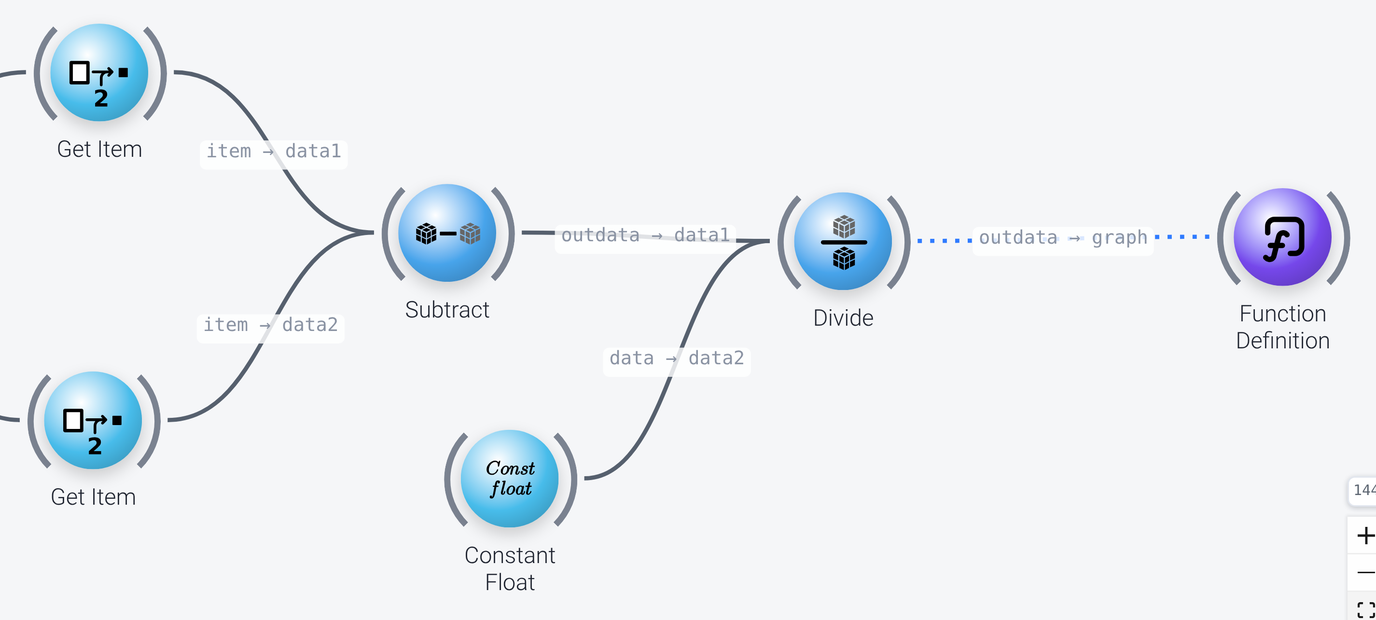
- Two
Get Itemnodes take the first and the last time stamp of the array (with thekeyset to[0]and[-1], respectively). Subtractsubtracts the first from the last time stamp, which gives the length of the data in seconds.Dividedivides this by the value 60 that is supplied by aConstant Floatnode, to convert it to minutes.
The output of the Divide node is wired into the graph port of the Function Definition node (the dotted wire indicates that a subgraph, and not data, is wired into the node), and it is passed back to the Function Call node as the result of the function.
Functions in complex pipelines
A common use of a function in a complex pipeline is to represent the preprocessing chain. The chain of nodes becomes the body of a function, and the main part of the pipeline, for instance a loop over files, calls it with a single Function Call node. This replaces a long string of nodes with one node, which simplifies the main part of the pipeline.