Cross-validation of a machine learning classifier
This example pipeline, Crossvalidation.pyp, is an end-to-end classification pipeline that performs leave-one-subject-out cross-validation: a classifier based on logistic regression is trained on the data of all subjects but one, tested on the data of the held-out subject, and this is repeated for every subject, so that the classification performance on previously unseen subjects can be calculated. It is also an example of several concepts that are used in more complex pipelines: iterating over a list of files with a loop (For Each), passing a subgraph to a node, and defining and calling a function.
The pipeline uses dataset 2a of the BCI Competition IV, a motor imagery data set with nine subjects, which needs to be downloaded separately (see below). Its task is to discriminate between the imagined movements of the left and the right hand.
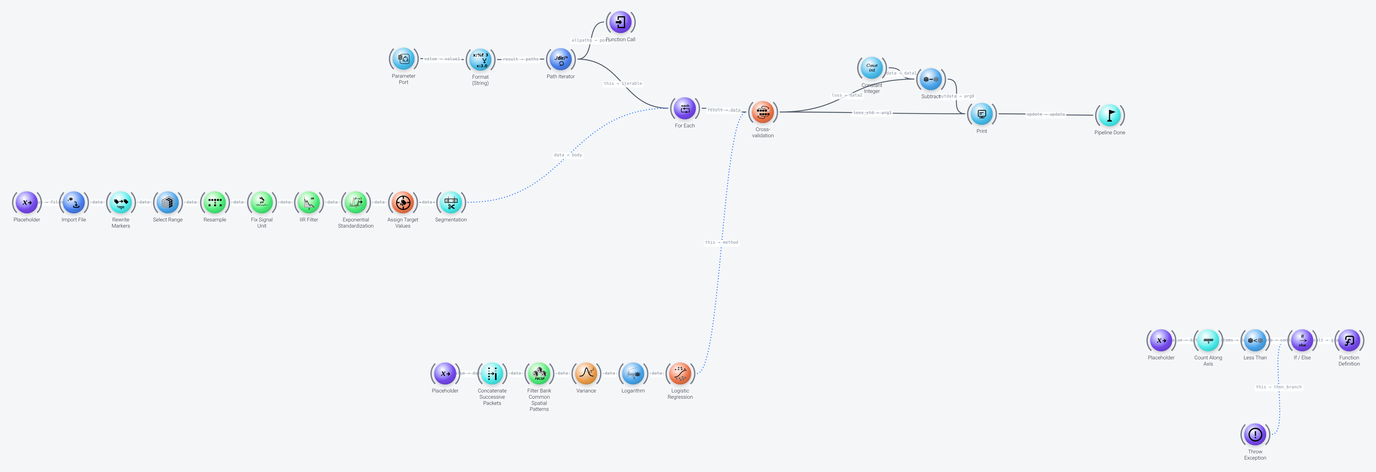
The pipeline can be divided into six parts, which we discuss in the following: finding the data files, preprocessing each file, cross-validation, the classification method that is cross-validated, the results, and a check that the data is present.
Finding the Data Files
Includes: Parameter Port, Format (String) and Path Iterator
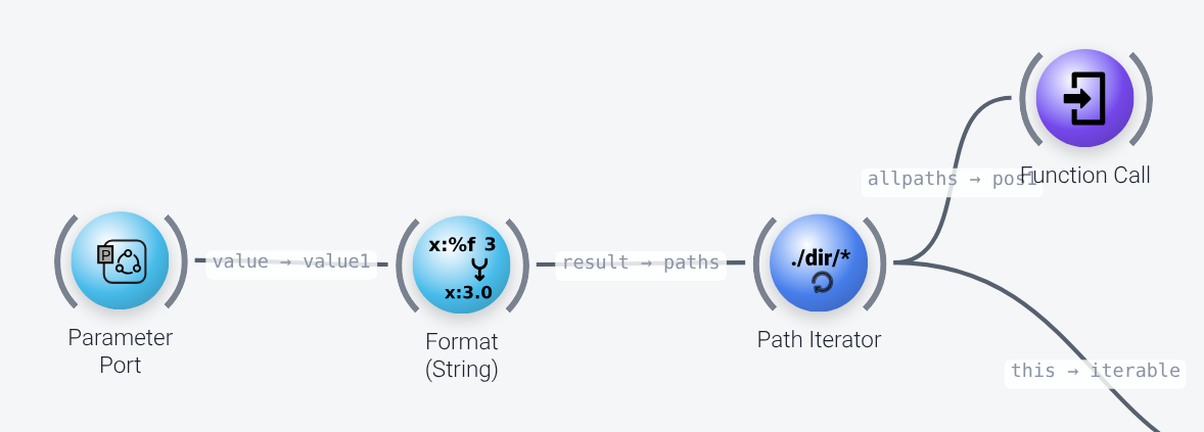
To use this pipeline, you need to download and extract dataset 2a from the BCI Competition IV website (the dataset is available at https://www.bbci.de/competition/download/competition_iv/BCICIV_2a_gdf.zip), and adapt the path in the Parameter Port node (its default property, which is exposed as the parameter data_root) to the folder in which you put the .gdf files.
The Format (String) node appends the pattern A*T.gdf to this path (its string is %s/A*T.gdf), which matches the training file of each subject. The Path Iterator node (the start of the pipeline) takes this list of paths. On every tick, it can output one file name of the list of files that it found, and it also outputs an iterable, which is what this pipeline uses (its this output), to loop over all the files.
Preprocessing Each File
Includes: Placeholder, Import File, Rewrite Markers, Select Range, Resample, Fix Signal Unit, IIR Filter, Exponential Standardization, Assign Target Values and Segmentation
The Path Iterator node generates a list of matching files to iterate over and passes these to a For Each node, which runs a loop body once for every file. The loop body is the chain of nodes in the left of the pipeline, which starts with a Placeholder node and ends with the Segmentation node, whose output is wired into the body port of For Each. A dotted wire (as opposed to a solid one) indicates that a subgraph, and not data, is being wired into a node. On every iteration, For Each assigns a new file name to the filepath placeholder (the slotname of the Placeholder node), from which it is passed on to the filename property of Import File, and the nodes in the chain import and preprocess this one file. Each pass of this chain produces one packet, and the For Each node collects them into a list of packets, which is passed on to the cross-validation node once the iteration is finished (its collect property is list).
Subgraphs: wiring nodes instead of data
Normally, a wire carries data from one node to the next. A dotted wire is different: it carries a subgraph, i.e., a chain of nodes that is not executed where it stands, but is handed to the node at the other end of the wire, which can run it itself, as often as it needs to, and with whatever input it chooses. The chain starts with a Placeholder node, which stands for the input that the receiving node supplies on each run.
Here, the preprocessing chain is wired into the body port of For Each, instead of being fed with data, because the chain has to run once for every file, with a different file path each time, and it is For Each that decides when, and how often, that happens. If the chain were wired up with ordinary data wires, it would run only once. The Cross-validation node uses the same mechanism for the classification method, as we will see below.
The loop body contains the following nodes, first the EEG preprocessing:
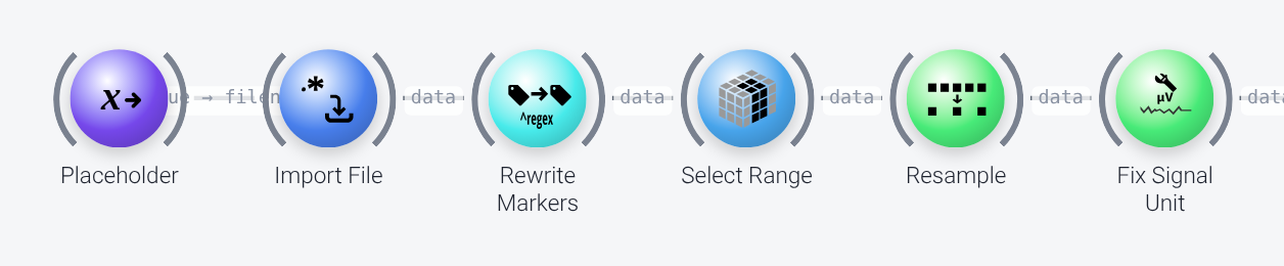
Import Fileimports the file given by thefilepathplaceholder.Rewrite Markersrewrites the numeric event codes of the data set to descriptive marker names, for instance 769 toleftand 770 toright, and drops all other markers (remove_all_others), using the mapping in itsrulesproperty.Select Rangekeeps the first 22 channels (:22, usingindiceson thespaceaxis), which are the EEG channels of this data set. This ensures no non-EEG channels are processed.Resampleresamples the data to 125 Hz (itsrateproperty).Fix Signal Unitinfers the unit of the signal from the amplitude range that is expected for EEG, and corrects it, so that the data is in microvolts (thedesired_unit). This is needed because the unit that is given in the data files is not always reliable.
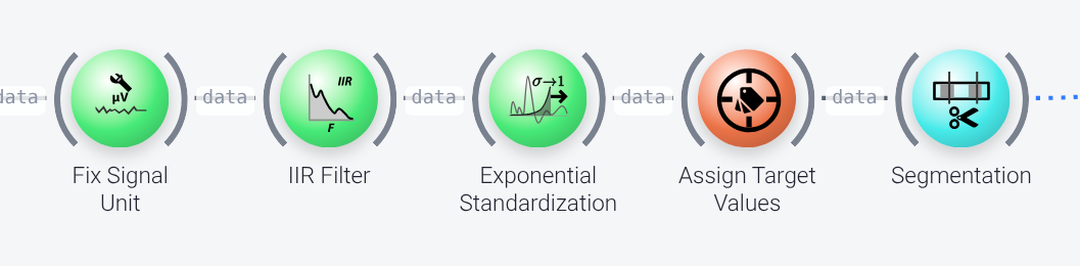
IIR Filteris a band-pass filter (a Butterworth filter,designofbutterandorderof 3) withfrequenciesof 3, 4, 40 and 41 Hz.Exponential Standardizationstandardizes each channel to approximately zero mean and unit variance, based on the statistics of the past data, where more recent data is weighted more (theforget_halftimeproperty, 6 seconds, is the time constant of the exponential weighting).Assign Target Valuesselects the markers that are used for classification, which must match event markers in the data, and assigns the target values (itsmappingassigns 0 toleftand 1 toright).Segmentationcuts the data into segments around these markers, from 0.5 to 2.5 seconds after the marker (time_bounds).
Cross-Validation
Includes: Cross-validation
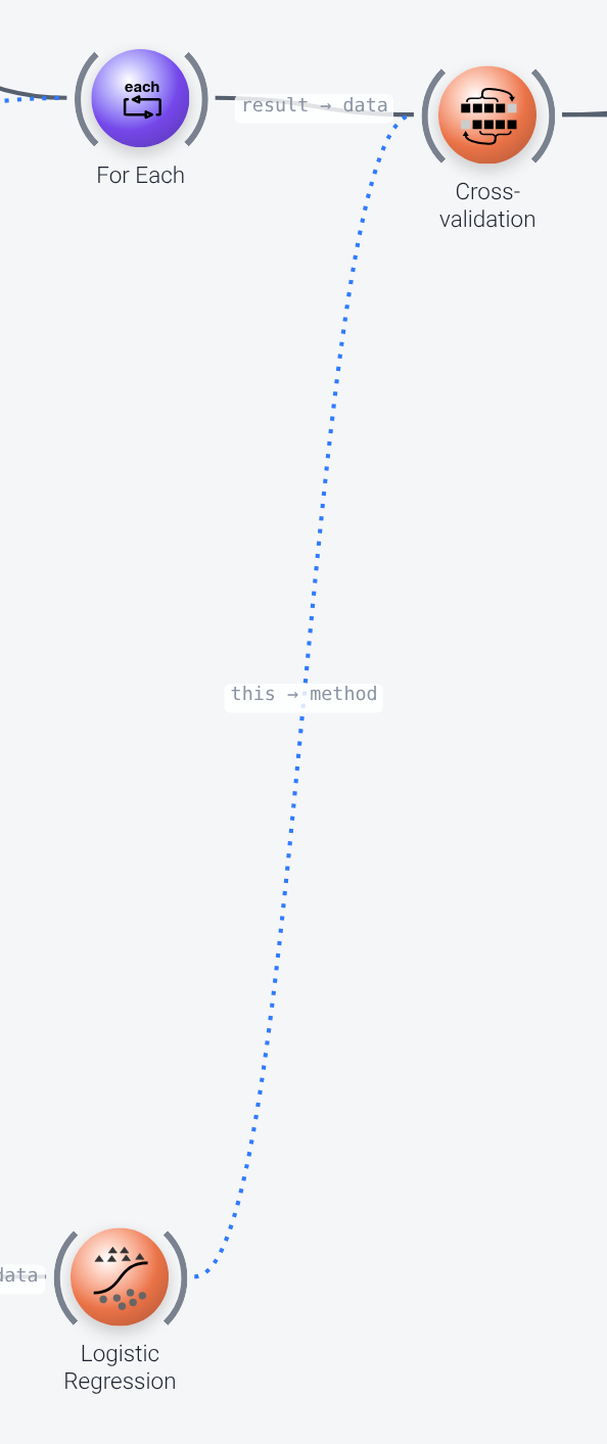
The Cross-validation node is the heart of this pipeline. It has two inputs:
- On its
dataport, it receives the list of preprocessed packets, one per subject, that theFor Eachnode collected from the preprocessing chain. - On its
methodport, it receives the classification method, which is a subgraph (shown as wired with a dotted wire; see earlier explanation of subgraphs), that is discussed in the next section.
Once the Cross-validation node has received the list of preprocessed packets (each of which represents one preprocessed session), it runs the classification method repeatedly on different groups of those packets. For each fold, it runs the classification branch first, in training mode, on all of the incoming packets except the held-out ones (this would be one packet in a leave-one-out design), which trains the model. It then runs the method again in test mode on the held-out data, and measures how well the predictions match the true labels.
A fresh, untrained copy of the method is used for each fold, so that no information can leak from the test data into the training. With folds set to 1, this is leave-one-out cross-validation. Since each packet in the list is one subject, this means that each subject is held out once, which is leave-one-subject-out cross-validation. (Other cross-validation designs can be set up by changing the properties of the node. For instance, a folds of 10 together with a repeats of 10 gives a 10-fold cross-validation that is repeated 10 times with randomized splits of the data. See the documentation of the node for details.)
The classification performance is sent out through the loss port. The loss metric is set by the loss_metrics property, here the misclassification rate (MCR), and the standard deviation across the folds is sent out through the loss_std port.
The Classification Method
Includes: Placeholder, Concatenate Successive Packets, Filter Bank Common Spatial Patterns, Variance, Logarithm and Logistic Regression
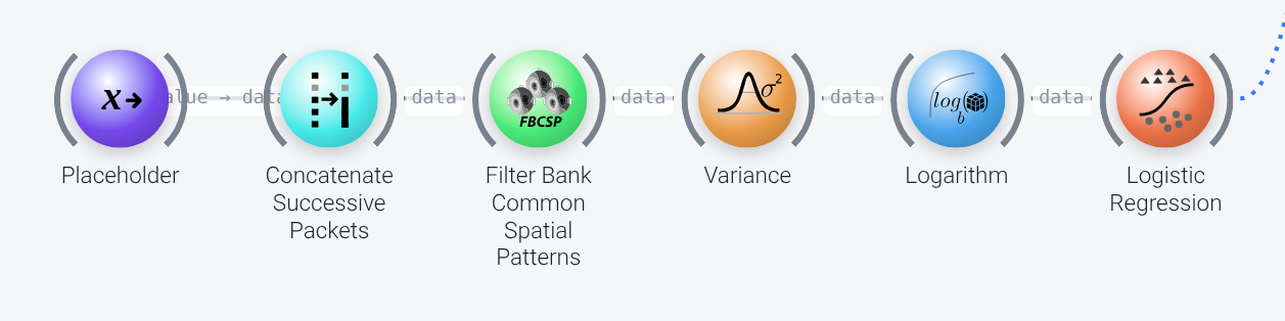
The classification method is a subgraph which is wired into the method port of the Cross-validation node (see the previous section). It starts with a Placeholder node whose slotname is data (matching an object named data that is sent out by the Cross-validation node), and its last node, Logistic Regression, is wired into the method port through its this output.
The Cross-validation node passes the data that the method is to be trained or tested on into the data placeholder: in training mode the packets of the training subjects, and in test mode the packet of the held-out subject, both taken from the list of preprocessed packets that For Each collected. The nodes of the method are:
Concatenate Successive Packetsconcatenates the packets of the individual files into a single packet, along theinstanceaxis.Filter Bank Common Spatial Patterns(FBCSP) uses a CSP algorithm to extract components whose variance optimally discriminates between the two conditions, in four frequency bands (bands: 4-7, 8-12, 13-30 and 31-42 Hz). Itsnofproperty, 3, is the number of pattern pairs per band.Variancecomputes the variance of each component over time, andLogarithmtakes its logarithm. This yields the features for the classifier.Logistic Regressionclassifies the features. It is trained with a regularization (regularizerofelasticnet) whose strength is chosen from the values inalphasby 5-fold cross-validation (num_folds), using accuracy as the criterion (search_metric).
The classification method that is used here is only an example, since the purpose of this pipeline is to show how to use the Cross-validation node. You can replace it with any other classification method (any chain of nodes from the data placeholder to a classifier, whose this output is wired into the method port). You could even have several classification methods in the pipeline and use an If / Else node, as in the conditional workflow example, to select the one that is run, depending on a parameter.
Results
Includes: Cross-validation, Constant Integer, Subtract, Print and Pipeline Done
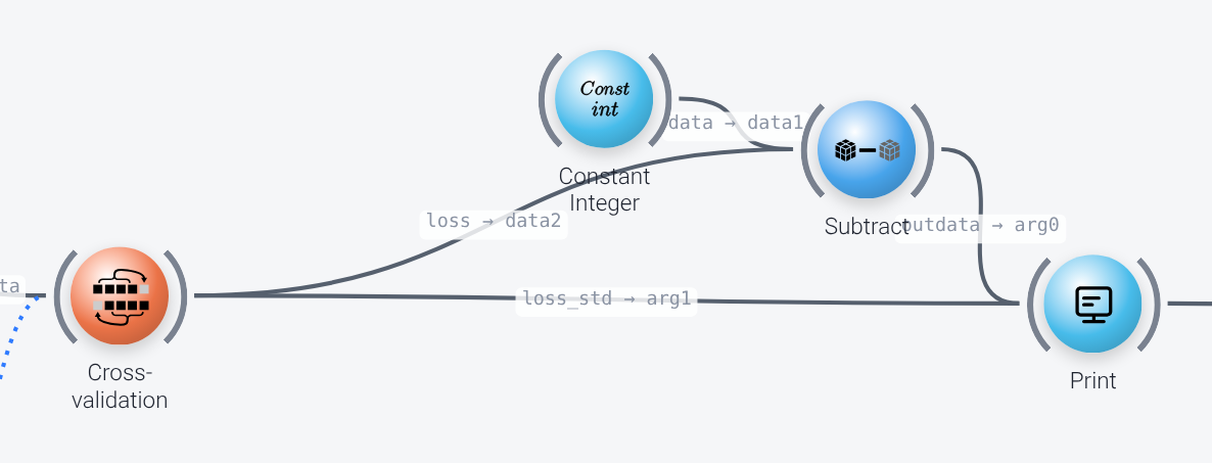
As mentioned earlier, the Cross-validation node outputs its misclassification rate through its loss port. To get the classification accuracy from the misclassification rate, a Subtract node subtracts the loss from a Constant Integer node with the value 1. The result and the standard deviation are then printed by a Print node, with the string Leave-one-subject-out accuracy: %.2f +/- %.2f (its string property). Instead of printing the results to the console, you could save them to a CSV file with a Record to CSV node.
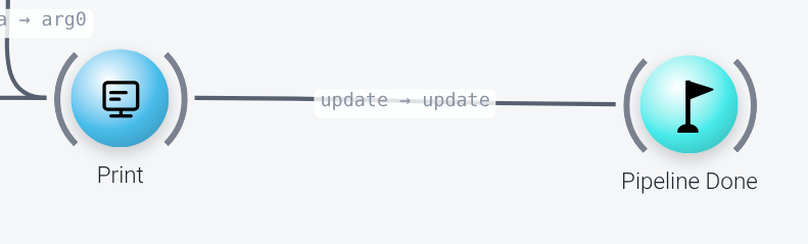
The Pipeline Done node is not strictly necessary here, but as a general rule, in complex pipelines with various loops, it is useful to add it to ensure that the pipeline is reported as finished, and therefore stops running, when the data reaches this point, to avoid endless looping.
Checking that the Data is Present
Includes: Placeholder, Count Along Axis, Less Than, If / Else, Function Definition and Throw Exception
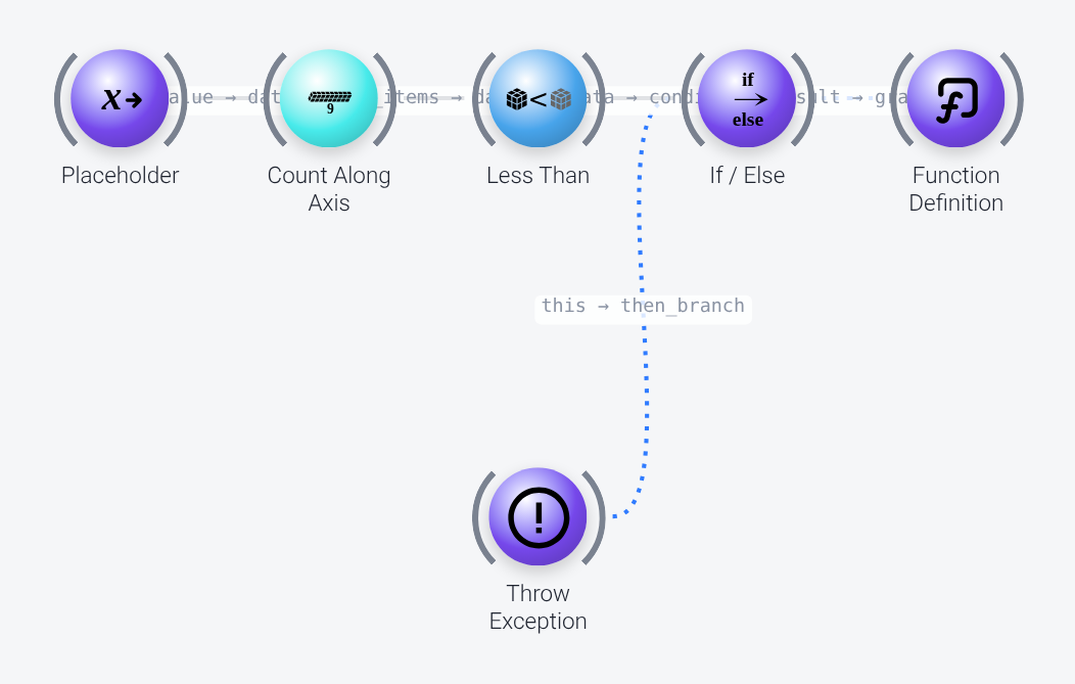
The nodes at the bottom right are a small utility function that checks whether the data set was downloaded correctly. The Function Definition node defines a function (its funcname is check_data, and its graph [signature] is (filelist)), whose body is the chain of nodes that is wired into it. The function receives the list of files as the filelist placeholder, Count Along Axis counts them, and Less Than checks whether there are fewer than 9 (the number of subjects). If so, the If / Else node runs its then_branch, in which a Throw Exception node throws a FileNotFoundError with the message that the data set was not found or is incomplete, and asks whether you downloaded the data. The function is called by the Function Call node near the top of the pipeline (see the first screenshot), with the list of all the paths found by Path Iterator (its allpaths output).