Stream prerecorded data and markers
This very simple example pipeline, StreamPlayBackDataWithMarkers.pyp, plays back a recording as an LSL stream, as if it came from a live device, together with its event markers. In general, pipelines can be operated either in online mode, where streaming data is processed, or in offline mode, where prerecorded data is processed. When you design and test a pipeline for streaming data, it is very useful to examine the behavior of the pipeline on streaming data that is reproducible. This can be done by streaming a prerecorded file through the pipeline, which is what this pipeline does.
Many of the other example pipelines contain the same three nodes (an import node, Stream Data and LSL Output) as a "playback branch", so that they can be run without a live data source (see Data input in the example pipelines). This pipeline is a standalone version of it.
You can run this pipeline in addition to your main pipeline in your work environment. It streams the prerecorded data over LSL, and your main pipeline reads the streaming data with an LSL Input node. When you have finished designing and testing your pipeline, you can stop this additional pipeline, and the main pipeline can use the same LSL Input node to read the streaming data from the network, from a live device.
Running multiple pipelines simultaneously and streaming out the results of one pipeline to another pipeline can be a good way to re-use workflows and reduce compute load. For example, you might have one pipeline that preprocesses your data and restreams it over LSL, and then multiple other pipelines which each take the preprocessed data and perform further computations. This avoids each compute pipeline from doing its own preprocessing. You can apply the same logic to other compute heavy functions, such as source localization.
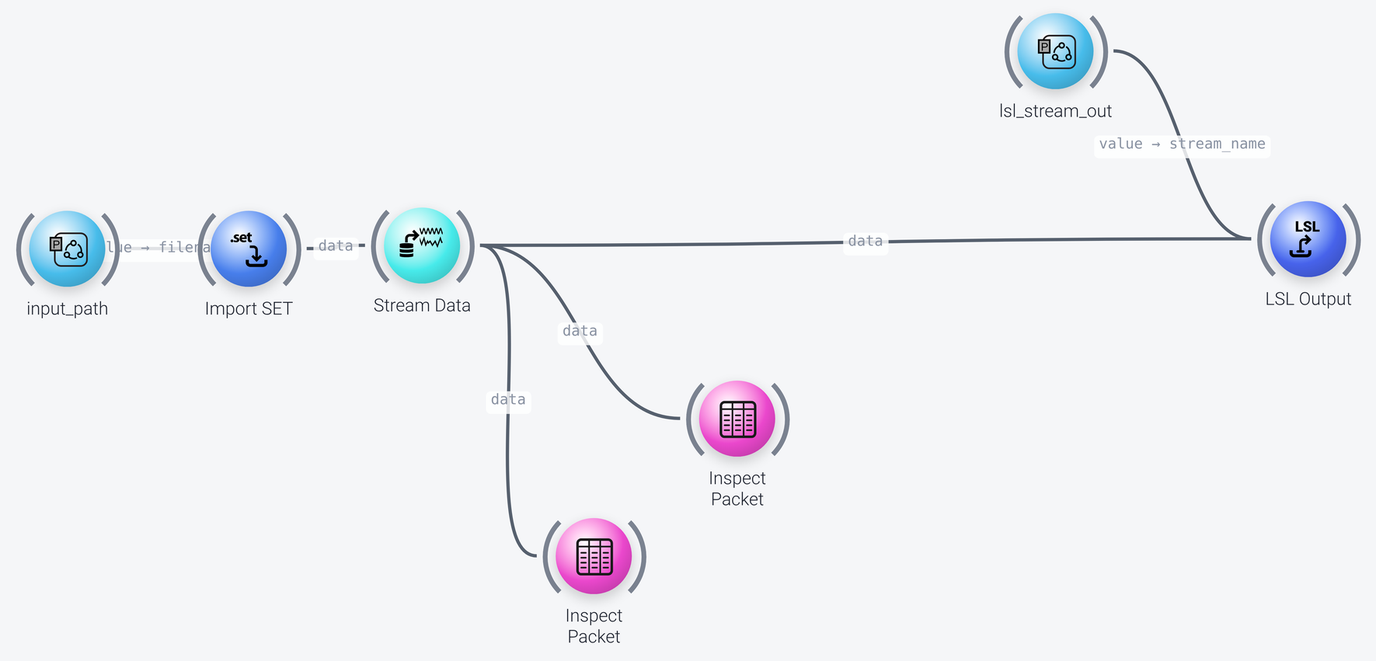
The pipeline can be divided into two parts, which we discuss in the following: loading and streaming the data, and sending it out over LSL.
Loading and Streaming the Data
Includes: Parameter Port, Import SET, Stream Data and Inspect Packet
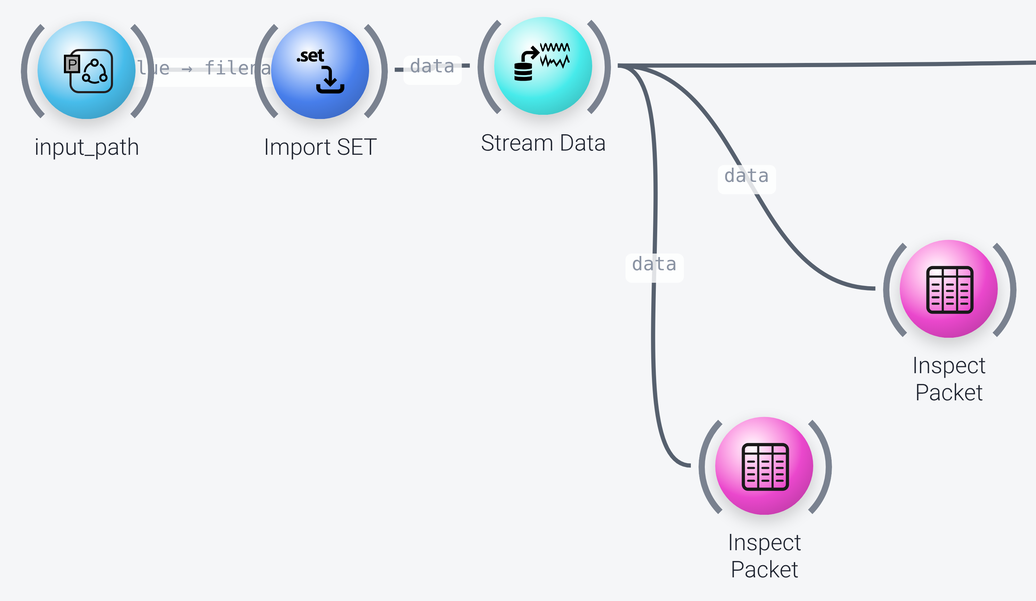
The recording is loaded by the Import SET node, which reads EEGLAB .set files (here the example file FlankerTest.set). The file name is not typed into the node, but comes from a Parameter Port named input_path. A Parameter Port node exposes a parameter that can be easily set over the NeuroPype API (see the developer documentation and the tutorial on exposing parameters with ParameterPorts): you wire its value into the property of the node that you want to configure, here the filename of Import SET.
The Import File node can load files of different formats, and farms out the importing to the appropriate function. However, some formats, such as XDF, have additional parameters that are specific to that format, so it is recommended to use the import node of the particular format (such as Import XDF) to have access to them.
The Stream Data node streams the data, sending it out in packets. To simulate a real device, its timing property is set to wallclock, which makes the playback based on the actual elapsed time, i.e., in real time. You can speed up the playback by setting the speedup property, which is the speedup relative to the actual elapsed time (for instance, 2 means that the data is played back at twice the real-time speed). With looping enabled, the data is streamed in a loop. The hitch_probability property (1 percent here) is the probability of simulated hitches, i.e., empty packets, which can be used to test whether the downstream nodes are robust to them.
The two Inspect Packet nodes show the data that is being streamed in windows, one for the EEG data and one for the event markers (its show_markers_table property is enabled), which is useful for viewing what is being streamed out. In a production setting, you want to turn them off, which you can do by right-clicking the wire that goes to them and deselecting Enabled.
Sending the Data out over LSL
Includes: Parameter Port and LSL Output
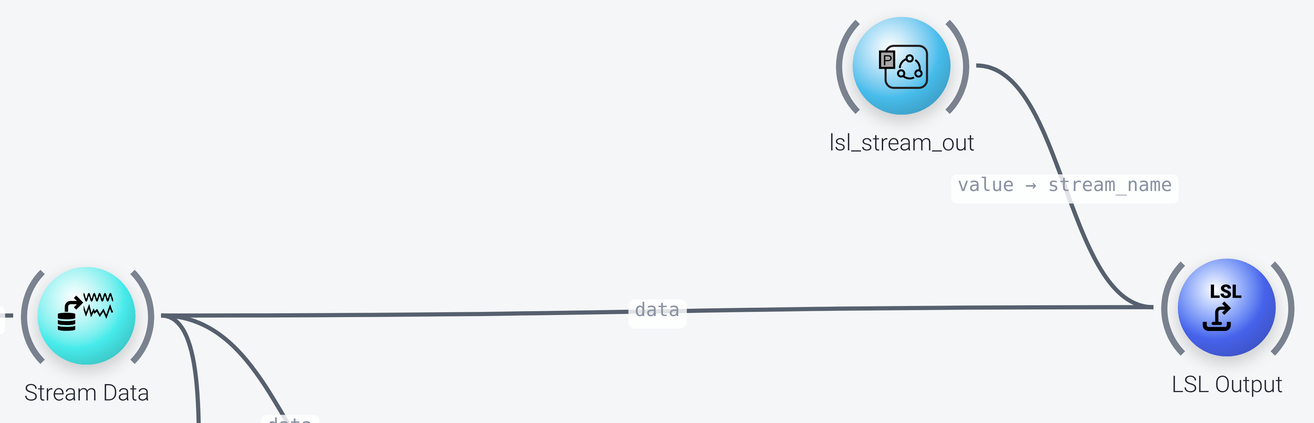
The LSL Output node sends the data out over LSL. The name of the stream, its stream_name property, comes from a second Parameter Port, named lsl_stream_out, with a default of MyPlaybackStream. Note that the value of the parameter port is wired into the stream_name port of the node. The stream_type is EEG, so a type='EEG' query finds it as well.
The recording has event markers, so an event stream is created when it is imported. Since send_markers is enabled in the LSL Output node, a marker LSL stream (named MyPlaybackStream-markers) is created in addition to the EEG stream. To receive both in another pipeline, set the marker_query property of its LSL Input node, for instance to type='Markers' (see the Calibrate on prerecorded data example).
The use_data_timestamps property is enabled, so LSL Output uses the original time stamps in the data. This is important if you are also streaming recorded event markers, so that the signal and the markers are in the same time domain, which is the case here. If you are restreaming data for test or viewing purposes, and want to use the current time stamps so that the streamed data in the same time domain as some live data or event markers from another device, set this property to False, which causes the LSL Output node to restamp the data with the current clock.